
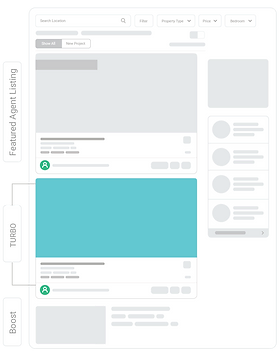
Turbo Your Listing Exposure by Up to 12X* with a Top-Ranking Spot
*Based on DDproperty internal data, comparing Turbo listings against regular listings, Jan 2022 – Mar 2022
Full on Turbo Mode
Turbo is packed with all the functions that will give your listing the advantage it needs.
Activate your key listings easily via AgentNet, with the use of Ad Credits, and see its performance go into overdrive.
Activate your key listings easily via AgentNet, with the use of Ad Credits, and see its performance go into overdrive.
Turbo Efficiency
See how your most important listing can become highly effectively simply by switching on Turbo. Take a look at how Turbo differs from other listing types.
Featured Agents
Turbo
Boost
Regular Listing
Features
Search Ranking
Usage Limit
Up to 5 targeting slots
Unlimited
Unlimited
Unlimited
Listing Card Size
& Features
& Features
Largest Listing Card with
Bronze branding
Bronze branding
Corporate Plus display
features*
features*
* Excluding Cover Video
Visibility & Brand Impact
Professional Branding
Featured Agent Name Card
on SRP and Agent Directory
on SRP and Agent Directory
Featured Agent badge on
Listing Card
Listing Card
-
-
-
Impression/Listing
12X
16X
2.1X
Baseline
Views/Listing
8X
7X
1.7X
Baseline
Leads/Listing
5X
4X
1.3X
Baseline
Usage & Validity
Active Period
30 days
7 days
7 days
-
Auto-renewal Available
-
Transferable
-
-
-

Experiencing Turbo
Powered by Ad Credits
You can Turbo your listing with no payment upfront as Ad Credits are readily available in your Agent Package!
The amount of Ad Credits needed to Turbo a listing for 7 days, is fixed at a rate and differs from listing type, property type and location. The credit quantity is displayed next to your selected listing on AgentNet > Listings.

Experiencing Turbo
Powered by Ad Credits
You can Turbo your listing with no payment upfront as Ad Credits are readily available in your Agent Package!
The amount of Ad Credits needed to Turbo a listing for 7 days, is fixed at a rate and differs from listing type, property type and location. The credit quantity is displayed next to your selected listing on AgentNet > Listings.
Get Set, Turbo
Booked through AgentNet (Web or Mobile App), you can Turbo your listings any time at your convenience.
With just a few clicks, your listing exposure will be on its way to fully power-up, with each Turbo action lasting for 7 days.
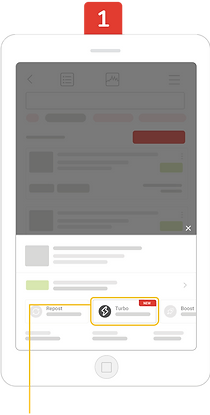
Go to AgentNet > My Listings. Choose the listing you intend to Turbo and click on the “Turbo” icon 
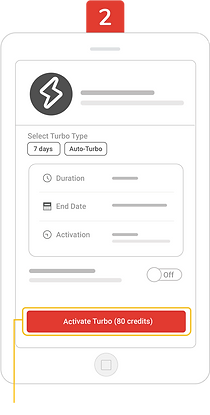
Details of your Turbo booking is shown here. Ad Credits will be deducted upon clicking on “Activate Turbo”.
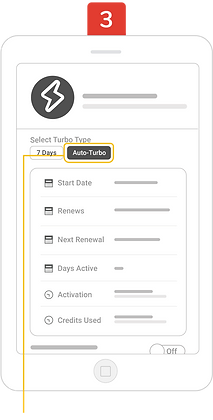
To Auto-Turbo, tick the checkbox and details of your Turbo booking will be refreshed. If all is good, click on “Auto-Turbo”.
The red button will change to “Auto-Turbo Activated” once Auto-Turbo is successfully activated.
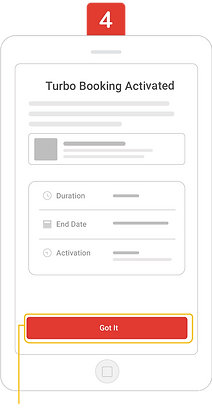
When you have made a successful Turbo booking, the Turbo next to your listing turns red. The start and end date of your Turbo booking will also be shown.
If you have an active Boost or Spotlight booking on the listing you wish to Turbo, you will only have to top up for the remainder of the Ad Credits required to enjoy this all rounded feature!
If you have an active Boost or Spotlight booking on the listing you wish to Turbo, you will only have to top up for the remainder of the Ad Credits required to enjoy this all rounded feature!
What is Auto-Turbo?
Auto-Turbo allows you to auto-renew your Turbo listing till you have turned it off. The Ad Credits are deducted every 7 days upon renewal, and the amount of credits used in the subsequent weeks may vary. With each renewal, your Turbo listing ranking will be refreshed within the Turbo tier. Learn more.
Questions on Turbo?
Contact our Customer Care at +0 2204 9555 or read our Help Articles for more information
0



Hi, Agent Partner!
How can we help you?
Send us a message
We typically reply in a few hours

Have a question or want to list a property?
Send us a message and we'll reply within 1-2 business days.
We're here from Mon-Fri,
9AM to 6PM (business days),
or contact us at +66 2204 9555.
Send us a message and we'll reply within 1-2 business days.
We're here from Mon-Fri,
9AM to 6PM (business days),
or contact us at +66 2204 9555.
9 collections
ยินดีต้อนรับสู่ระบบ AgentNet (Welcome to AgentNet)
เริ่มต้นการใช้งานระบบ AgentNet
45 articles
การตั้งค่าเบราว์เซอร์ อินเตอร์เน็ต
ต้องการความช่วยเหลือ (Get help from DDproperty)
วิธีการใช้งานระบบเว็บไซต์ระบบ AgentNet บนคอมพิวเตอร์ และ โทรศัพท์มือถือ (How to use DDproperty's AgentNet on Desktop and Mobile)
- What is Gating of Enquiries?
- Gating of Enquiries คืออะไร ( Lead Gating)
- อบรมการใช้งานฟรี (AgentNet Training)
- วิธีการดาวน์โหลด และ ติดตั้ง Google Chrome
- ปรับปรุงความปลอดภัยสำหรับบัญชีของคุณ (Enhance Your Account Security)
- จัดการ “ข้อความของฉัน” ผ่านระบบ AgentNet (Managing Your Messages On AgentNet)
- การเปลี่ยนแปลงการรับข่าวสารทางอีเมล (Change your email subscriptions)
- การเปลี่ยนภาษาไทย/ภาษาอังกฤษ (EN/TH)
- เข้าสู่ระบบบัญชี AgentNet ของคุณ (Login to Your AgentNet Account)
- เพิ่มโอกาสในการหาลูกค้าที่มีประสิทธิภาพ (Wanted Leads)
- Forgot Password? Reset Account Password
- Get Potential Listings with Wanted Leads
- Install and Upgrade Google Chrome
- Login to Your AgentNet Account
- Managing Your Messages On AgentNet
- Enhance Your Account Security
- Change Your Email Subscriptions
- AgentNet Training
วิธีการใช้งานแอปพลิเคชัน AgentNet (How to use DDproperty's AgentNet Mobile Application)
- DDproperty AgentNet Mobile Application Update
- อัปเดตแอปพลิเคชัน AgentNet บนมือถือ (DDproperty AgentNet Mobile Application Update)
- วิธีนำประกาศเก่ากลับเข้าระบบ (How to re-activate listing on AgentNet Mobile Application)
- วิธีการลงรูปผ่านมือถือ (Upload photos to your listing on AgentNet Mobile Application)
- วิธีการยกเลิกประกาศผ่านแอปพลิเคชัน (How to unlist on AgentNet Mobile Application)
- วิธีการติดตั้ง App AgentNet (How to install AgentNet mobile application)
- การสร้างประกาศผ่านมือถือ (Post your listing on AgentNet Mobile Application)
- การติดต่อลูกค้าผ่านแอปพลิเคชัน (Mobile chat lead inquiries)
- การแชร์ประกาศของคุณบนแอปพลิเคชัน (Sharing your listing on AgentNet Mobile Application)
- แก้ไขประกาศเมื่อขาย / มีคนเช่าแล้วผ่านแอปพลิเคชัน (Update your sold / rented listing on AgentNet Mobile Application)
- Upload Photos to Your Property Listing (Mobile)
- Update Your Sold/Rented Listing (Mobile)
- Repost Your Listings Automatically with Auto-Repost (Mobile App)
- Repost Your Listing (Mobile)
- Post a Property Listing (Mobile)
- Find Your Listing in DDproperty (Mobile)
- Download AgentNet Mobile App
ยินดีต้อนรับสู่ระบบ AgentNet (Welcome to AgentNet)
การจัดการเกี่ยวกับประกาศ (Managing your listings)
เรียนรู้วิธีการจัดการประกาศให้มีประสิทธิภาพมากขึ้น
44 articles
การจัดการลีด (Lead Management)
การต่ออายุประกาศ (Repost your listings)
การสร้างประกาศ
- AI Moderation Engine (AIME) ระบบตรวจสอบภาพทรัพย์อัติโนมัติ
- วิธีการใส่วิดีโอลงในประกาศ (Embed a video into your listing)
- การอัปโหลดรูปภาพลงประกาศ (How to upload photo to your listing)
- การตั้งค่าชื่อโครงการคอนโด (How to pre-listing condo information from DDproperty?)
- การลงประกาศประเภทที่ดิน/บ้าน/คอนโด ที่ไม่มีชื่อโครงการในระบบของดีดีพร็อพเพอร์ตี้ (Update Property Location for Landed Property)
- Upload Photos to Your Property Listing
- Post a Listing
- Embed a Video into Your Listing
การอัปเดตประกาศ (Update your listing)
การจัดการเกี่ยวกับประกาศ (Managing your listings)
- Lead Management: แนะนำเครื่องมือ Lead Quality
- อัปเกรดใหม่ ฟังก์ชันประสิทธิภาพของประกาศ (Enhanced Listing Performance Insights)
- วิธีการใส่ Plus Codes บนประกาศ
- ประเภทของประกาศ (Types of Listing)
- ข้อกำหนดสำหรับเขียนรายละเอียดการพาดหัว (Headline)
- ชื่อประกาศแบบใหม่ (Listing Details)
- โฉมใหม่!! “ประกาศของฉัน” ช่วยจัดการประกาศได้ง่ายกว่าที่เคย (Listing Management)
- Write a Description that Sells
- เขียนคำอธิบายที่ทำให้ขายได้ (Write a Description that Sells)
- Requirement for Headlines
- How to Insert Plus Code in Your Listings
เจาะลึกประสิทธิภาพ และ การวัดผลประสิทธิภาพของประกาศ (Understanding your Listing's Performance)
- ฟีเจอร์ Listing Ranking ช่วยวัดอันดับประกาศ
- ประกาศของคุณมีประสิทธิภาพแค่ไหน เมื่อเทียบกับคู่แข่ง? (How Are My Listings Performing Against Similar Listings?)
- คะแนนคุณภาพประกาศ (Ensure a High Listing Quality Score)
- คำถามเกี่ยวกับ การวัดผลประกาศ (All about Listing Performance Insights)
- การวัดการตอบสนองจากลูกค้า คืออะไร? (What is a Conversion Funnel?)
- เพิ่มประสิทธิภาพประกาศอย่างไร? (How Do I Improve My Listing’s Performance?)
- เช็คสถิติและประสิทธิภาพของประกาศ (Check your Listing’s Performance)
- What is a Conversion Funnel?
- How Are My Listings Performing Against Similar Listings?
- How Do I Improve My Listing’s Performance?
- Check Your Listing’s Performance
- Enhanced Listing Performance Insights
การใช้งาน เครดิต (All about Ad Credits)
รู้จักการใช้เครดิต เพื่อใช้งานฟีเจอร์ต่างๆของเรา
18 articles
เกี่ยวกับเครดิต (Ad Credit)
- รู้จักรายงานการใช้ Ad Credit (Ad Credits Consumption Report)
- วิธีการใช้งาน Ad Credit ที่กำลังจะหมดอายุของคุณ
- การกำหนดราคาแบบยืดหยุ่น (All About Dynamic Pricing)
- How to Use Up Your Expiring Ad Credits in Days
- About Ad Credits Consumption Report
- Ad Credits
- Ad Credits (เครดิต)
- All About Dynamic Pricing
การใช้งาน Turbo (Turbo Listing)
การใช้งานบูส (Boost Listing)
สร้างตัวตนของคุณบนโลกออนไลน์ด้วย DDproperty (Using DDproperty to build your brand)
เพิ่มโอกาสการดึงดูดจากลูกค้าเพียงเรียนรู้การสร้างตัวตนให้ถูกต้อง
28 articles
สร้างตัวตนผ่านทางเว็บไซต์ส่วนตัว My Web (Build a personal website using MyWeb)
ข้อมูลเชิงลึก (Insight)
ประกาศของคุณบนเว็บไซต์ DDproperty (Your DDproperty Listing)
- วิธีการหาประกาศบนเว็บไซต์ (Find your listing on DDproperty)
- สิ่งที่ควรทำระหว่างพาลูกค้าชมสถานที่ (Deliver insights to prospects during viewing)
- วิธีการเช็คราคา (How to determine the right property price?)
- ประกาศของคุณจะมีหน้าตาอย่างไรบนเว็บไซต์ (What does your listing look like to property seekers)
- พิมพ์ประกาศของคุณ (Print your listing)
เทคนิคการดึงดูดลูกค้า (Attracting your leads)
- สิ่งที่ควรทำก่อนไปถ่ายรูป และ พื้นฐานการถ่ายรูปง่าย ๆ ด้วยมือถือ (Things you need to know before taking property photo)
- ทำความรู้จักวิดีโอไลฟ์ (All About Live Tour)
- การตั้งค่าวิดีโอคอล (Setting Up A LIVE Video View)
- เขียนประวัติอย่างไรให้น่าสนใจ (Create an attractive agent profile)
- เทคนิคการเขียนหัวข้อประกาศ (Tips on what makes good Listing Headlines)
- Setting Up A LiveTour
- 10 เทคนิคการถ่ายรูปด้วยมือถือ (10 tips to take quality property photos with your phone )
- All About LiveTour
เทคนิคเพิ่มโอกาสในการเข้าถึงลูกค้า (Increasing your leads)
- สร้างภาพลักษณ์ความเป็นนายหน้ามืออาชีพให้กับคุณด้วย “โพรไฟล์สาธารณะ” (Enhance Your Personal Brand and Get More Leads with Your Public Profile)
- รู้จักหลักการทำงานของการค้นหาในเว็บไซต์ (How to Rank High in “Free Text Searches”)
- การเลือกชื่อบริษัทในข้อมูลโปรไฟล์สาธารณะ (Choose company name in profile)
- การใช้งานถามกูรู (AskGuru) เพื่อเชื่อมต่อกับผู้ค้นหาอสังหาริมทรัพย์ได้อย่างมีประสิทธิภาพ
- เขียนบรรยายประกาศอย่างไรดี? (How to write an interesting description)
- เทคนิคในการติดต่อกับลูกค้า (Technique to engage a new lead)
- Enhance Your Personal Brand and Get More Leads with Your Public Profile
- 7 เทคนิคในการทำประกาศให้น่าสนใจ (7 Tips to make your listing more interesting)
สร้างตัวตนของคุณบนโลกออนไลน์ด้วย DDproperty (Using DDproperty to build your brand)
- สร้างแบรนด์ให้คุณในฐานะผู้เชี่ยวชาญด้านอสังหาริมทรัพย์ที่น่าเชื่อถือด้วยการรับรองเอเจนต์ (Agent Certification FAQs)
- การยุติให้บริการ ‘เว็บไซต์ส่วนตัว’ (Personal Website)
- Behind the Scenes’: อัปเดตสำหรับเอเจนท์ (Behind the Scenes: Updates for Agent Partners)
- Brand Yourself As A Trusted & Credible Property Expert With Agent Certification (Agent Certification FAQs)
ฟีเจอร์โดดเด่น (Premium Features)
เรียนรู้วิธีการทำให้ประกาศของคุณโดดเด่นแก่คนหาทรัพย์
12 articles
ผู้เชี่ยวชาญประเภทต่าง ๆ (Featured Agent)
ฟีเจอร์โดดเด่น (Premium Features)
- Premium Project Listings (PPL)
- Premium Project Listings (PPL) 2
- จอง และขยายระยะเวลารายการ Featured Agent ของคุณ (Book and Extend a Featured Agent Slot)
- เพิ่มความน่าเชื่อถือผ่าน เมนู”ค้นหาตัวแทน” (Featured Agent on “Find Agent”)
- Featured Agent (เอเจนต์แนะนำ)
- Featured Agent on “Find Agent”
- Featured Agent
- Book and Extend a Featured Agent Slot
ประกาศ Exclusive (Exclusive Listing)
บิลและการจ่ายเงิน (Billing and Payment)
คำถามเกี่ยวกับการจ่ายเงินต่างๆ
6 articles
Billing and Payment
รายละเอียดการชำระเงิน
โปรโมชัน / แคมเปญ (Promotion / Campaign)
หาคำตอบเกี่ยวกับโปรโมชั่นและแคมเปญต่างๆของเราได้ที่นี่
6 articles
- คำถามเกี่ยวกับ DDproperty Expert Series 2022
- การแข่งขัน Featured Agent:ปลดล็อคศักยภาพการลงขายอสังหาริมทรัพย์ของคุณ พร้อมกับชิงรางวัลใหญ่
- เงื่อนไขและข้อกำหนด กิจกรรม Repostor Surprise
- เพิ่มการมองเห็นสูงสุด 12 เท่า* ด้วยฟรี Turbo สำหรับคุณ
- The Featured Agent Contest: Unleash Your Listing Potential & Win Big
- Thailand’s Next Top Agent (ให้คุณเป็นเอเจนท์ชั้นนำของไทย)
สิทธิพิเศษ Partner360
A More Rewarding Partner Experience, Like No Other
7 articles
DDproperty Academy
DDproperty Academy แหล่งความรู้สู่การเป็นเอเจนท์มืออาชีพ
2 articles