
What is Turbo?
Find out how you can get up to 12X more listing exposure
Turbo is a promotional tool designed to increase the visibility of your listing. It can be used for all property types (residential and commercial) and can be activated via AgentNet using Ad Credits.
Example of a Turbo Listing:
- Extra-large desktop display image
- Priority placement above Boost and regular listings
- Dedicated “Headline” section to highlight key selling points
- Agent or agency profile photo displayed to enhance credibility
What is the difference between Turbo, Boost, and Regular Listings?
- Turbo: Offers the highest visibility. Appears above Boost listings and occupies the largest display space.
- Boost: Appears above regular listings but below Turbo listings.
- Regular Listings: Displayed based on listing recency or renewal date.
Feature Comparison Table for Each Listing Type

How Many Ad Credits Are Required?
The number of Ad Credits required to activate Turbo depends on:
-
Property type
-
Location
-
Time period
The system applies Dynamic Pricing (market-based pricing adjustments) to reflect current market conditions. You can check the required Ad Credits directly on your listing page in AgentNet.
Note: Ad Credit requirements may vary depending on supply and demand in each location and time period.
Turbo Usage Details
Duration: 7 days per activation.
Can Turbo be activated via the app?
Yes, Turbo can be activated through the AgentNet app.
Does Turbo reduce the number of listings shown per page?
No, the number of listings per page remains unchanged.
Can I renew my listing while Turbo is active?
Yes. If you renew your listing while Turbo is active, your listing will be pushed to the top of the existing Turbo group.
Note: To prevent unintentional renewal, we recommend disabling auto-renewal before activating Turbo.
Can I Upgrade from Boost to Turbo?
Yes. If your listing is currently on Boost, you can upgrade to Turbo immediately by following these steps:
1. Go to the “My Listings” page on AgentNet and click the “Boost” button on the listing you wish to upgrade to Turbo.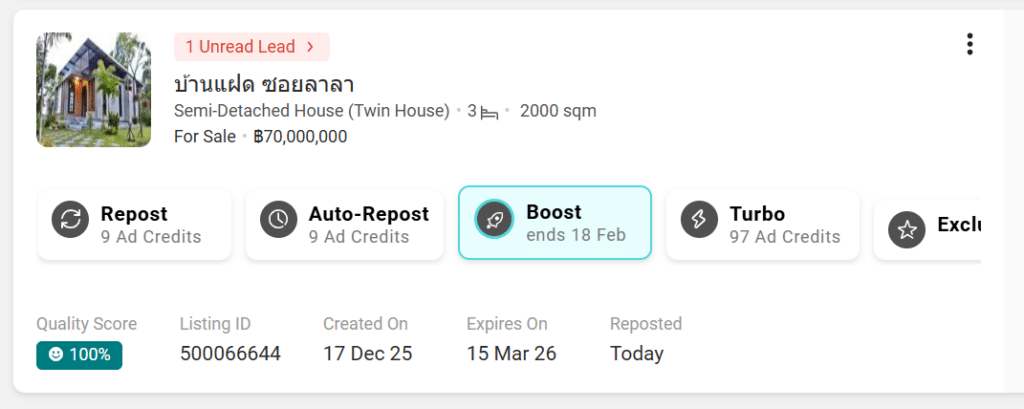
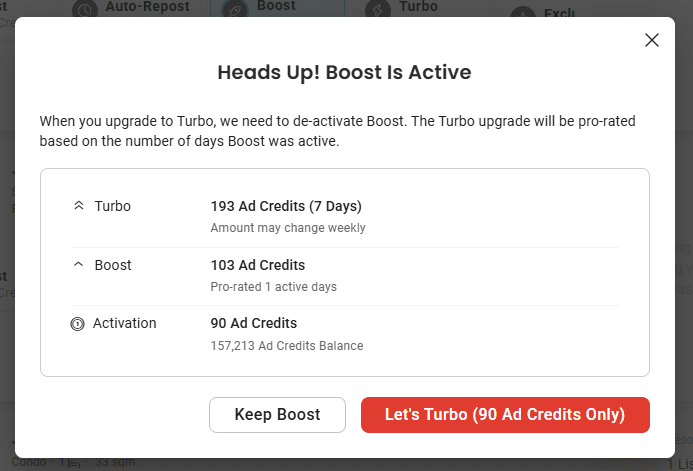
2. A pop-up warning regarding Boost usage will appear. Click “Let's Turbo (xxx Ad Credits only)”.
3. A pop-up will appear for you to select your Turbo option — either 7 Days or Auto-Turbo. After reviewing the details, click “Activate Turbo (xxx Ad Credits)”.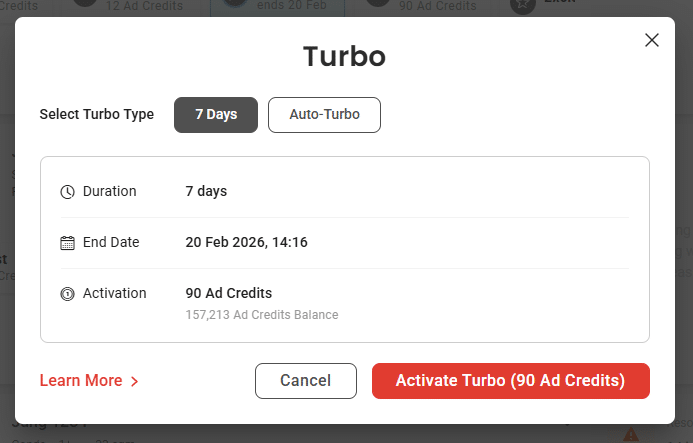
4. A confirmation pop-up will appear. Click “Got it” to proceed.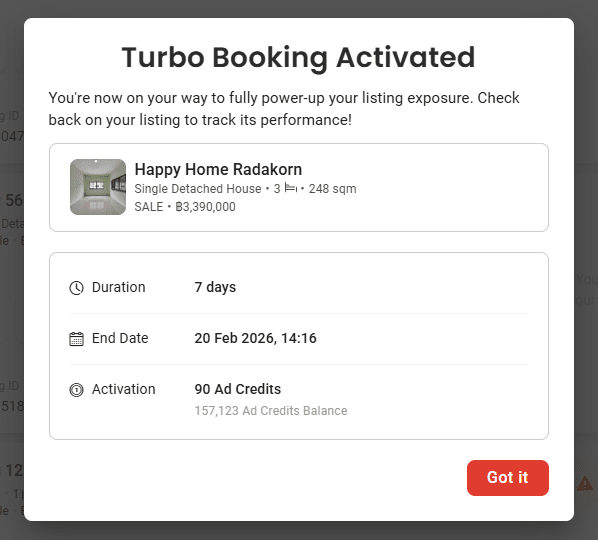
The system will automatically calculate the additional Ad Credits required (Top-up) on a prorated basis according to the remaining Boost duration.
Important Notes When Upgrading to Turbo
-
Boost will end immediately.
-
Turbo will start a new full 7-day cycle from the activation date.
Prorated Calculation Example
Agent A activates Boost using 50 Ad Credits on Day 1.
On Day 2, the agent decides to upgrade to Turbo, which requires 100 Ad Credits.
Since there are 6 days remaining out of the original 7-day Boost period, the system will calculate the unused portion of Boost on a prorated basis.
Therefore, only 57 additional Ad Credits are required:
100 Ad Credits − [(6 remaining days / 7 Boost days) × 50 Ad Credits]
= 100 − 43
= 57 Ad Credits
The system automatically calculates the required top-up amount and displays it in real time on AgentNet.
How Prorated Days Are Calculated
The system calculates usage based on the number of hours Boost has been active.
If usage exceeds 23 hours, it is counted as 1 full day.
Example:
- Boost starts on Monday at 3:00 PM.
The listing is upgraded to Turbo on Tuesday at 2:00 PM.
The system counts 23 hours of usage as 1 day.
Therefore, 6 days remain for the prorated credit calculation.
For general enquiries, please reach out to our Customer Service at the following:
-
Phone: 02-204-9555 (Mon - Fri 09:00 – 18:00 hrs., closed on Public Holidays)
-
Email: support@ddproperty.com
Related Article: What is Auto-Turbo?